Authorize your service with OPA and Envoy
Perform authentication checks for your services in an efficient way by implementing fine-grained request-level authorization using Open Policy Agent (OPA) and Envoy sidecars.
Description
In this How-To, we are explaining how we can perform authorization checks for our services in an efficient way. For this purpose, we're implementing fine-grained request-level authorization using Open Policy Agent (OPA) and Envoy sidecars. This setup allows us to centrally define and enforce policies outside of our application code, in a standardized and portable way. After a successful setup, an authorization check for all REST requests to your specific service will be performed. If the check is successful, the Envoy sidecar will forward the request to the main service. If not, the request will fail with a 403 HTTP status. Rather than embedding authorization logic directly into our service, we delegate authorization to OPA, which evaluates requests before they even reach our application. To define rules who is authorized to do what when OPA uses a declarative query language called Rego. You can check the official documentation on how to write your Rego policies here.
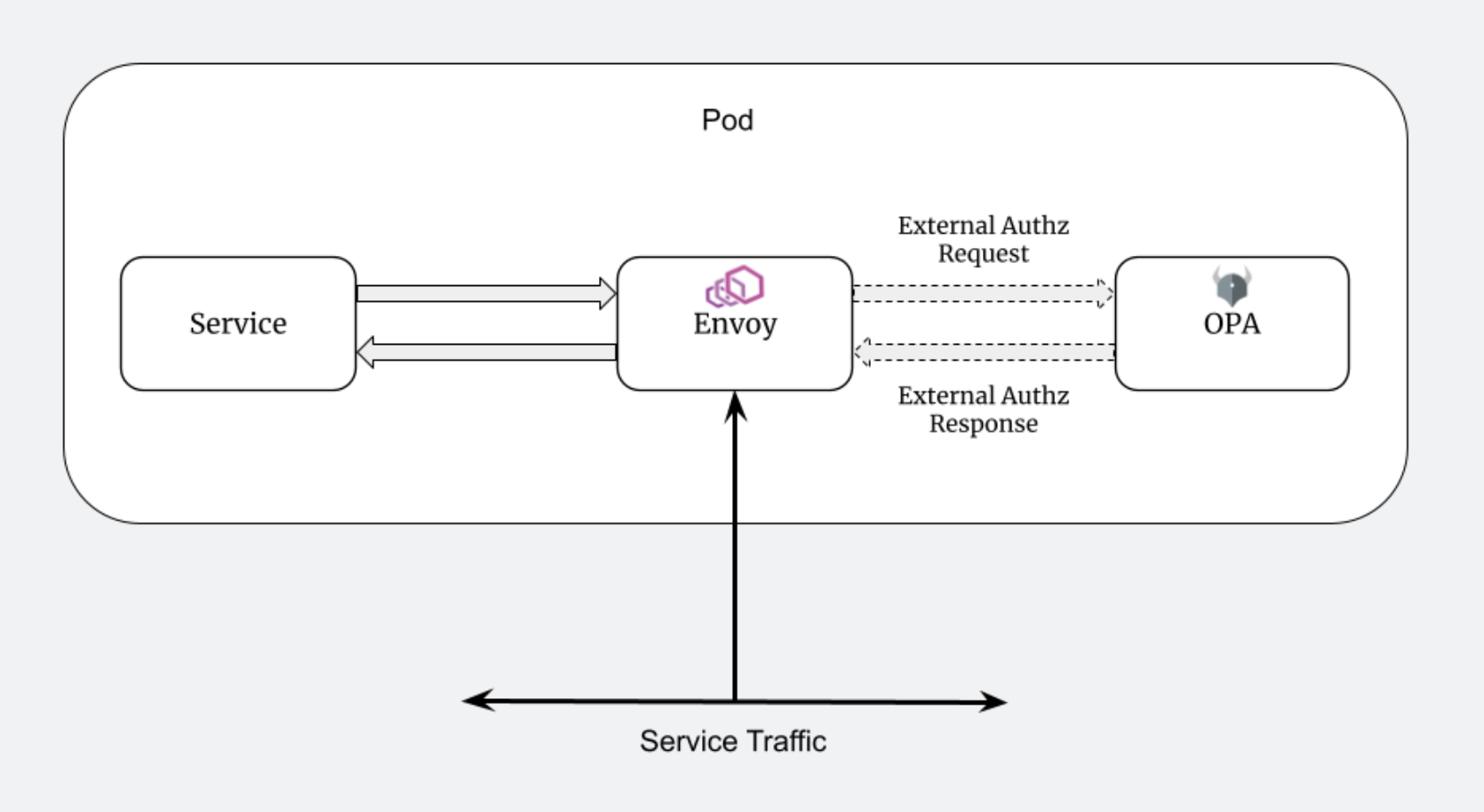
Requests are intercepted by Envoy, a lightweight proxy running as a sidecar. Envoy then queries OPA - running in another sidecar - to determine whether to allow or deny the request.
Why we are doing this?
This architecture brings several advantages:
- Decouples authorization from business logic - Policies can be managed independently of code.
- Standardized security - All services enforce policies in a consistent way.
- No changes needed to app code - As long as the traffic flows through Envoy, all requests can be evaluated by OPA.
- Easy to test and update policies - OPA policies can be version-controlled and tested separately.
Steps
Here's a breakdown of what you need to set up OPA and Envoy as sidecars alongside your application:
1. Include Your Helm Chart in the Project
Start by including your service's Helm chart in the root of your project (if not already done). This gives you control over the Kubernetes manifests for deploying the service and its sidecars. You can find a description on how to do that here: How-To: Perform Remote debugging.
2. Create ConfigMaps
You need two ConfigMaps: one for the OPA policy configuration and one for the Envoy configuration.
OPA ConfigMap
Contains the Rego policy and any additional OPA config. For our use case, we have a simple authorization policy that checks whether the /createOrder endpoint is being called. If so, it checks if the bearer token contains the necessary access role.
OPA configMap
kind: ConfigMap
apiVersion: v1
metadata:
  name: {{ printf "%s-opa-policy" (include "serviceproject.deployment.identifier" .) | quote }}
  namespace: {{ .Release.Namespace | quote }}
  labels:
    app.kubernetes.io/name: {{ include "serviceproject.deployment.identifier" . | quote }}
data:
  authz.rego: |
    package envoy.authz
    default allow = false
    allow = true if {
      not is_createOrder_request
    }
    allow = true if {
      is_createOrder_request
      has_required_role
    }
    is_createOrder_request if {
      path := input.attributes.request.http.path
      method := input.attributes.request.http.method
      endswith(path, "/createOrder")
      lower(method) == "post"
    }
    has_required_role if {
      not decoded_payload.resource_access.account.roles  # Allow when roles are missing, e.g. for requests via the Swagger UI
    } else = true if {
      decoded_payload.realm_access.roles[_] == "roboflow_customer"
    }
    decoded_payload := payload if {
      token := input.attributes.request.http.headers.authorization
      startswith(token, "Bearer ")
      jwt := substring(token, count("Bearer "), -1)
      [_, payload, _] := io.jwt.decode(jwt)
    }
    main = {
      "allowed": allow
    }
  opa-config.yaml: |
    services:
      - name: envoy
        url: http://localhost:8181
    plugins:
      envoy_ext_authz_grpc:
        addr: 0.0.0.0:9191
        path: envoy/authz/allow
        enable_reflection: true
    decision_logs:
      console: true
Envoy ConfigMap
Configures Envoy to:
- Accept HTTPS requests
- Forward them to OPA for decision-making
- Route approved requests to your application container
Envoy ConfigMap
kind: ConfigMap
apiVersion: v1
metadata:
  name: {{ printf "%s-envoy-config" (include "serviceproject.deployment.identifier" .) | quote }}
  namespace: {{ .Release.Namespace | quote }}
data:
  envoy.yaml: |
  static_resources:
     listeners:
         - name: listener_0

# Envoy will listen on all interfaces on port 8888 for incoming   HTTPS requests
 address:
     socket_address:
     address: 0.0.0.0
     port_value: 8888
     filter_chains:
     - transport_socket:

# TLS transport socket for terminating HTTPS traffic from clients
 name: envoy.transport_sockets.tls
 typed_config:
 "@type": type.googleapis.com/envoy.extensions.transport_sockets.tls.v3.DownstreamTlsContext
     common_tls_context:
         tls_certificates:
             - certificate_chain:
                filename: "/etc/envoy/tls/tls.crt"
                private_key:
                filename: "/etc/envoy/tls/tls.key"
        filters:
            - name: envoy.filters.network.http_connection_manager
             typed_config:
                "@type": type.googleapis.com/envoy.extensions.filters.network.http_connection_manager.v3.HttpConnectionManager
                 stat_prefix: ingress_http
                 route_config:
                 name: local_route
        virtual_hosts:
             - name: local_service
              domains: ["*"] # Accept requests for any host
                routes:
                - match:
                     prefix: "/"
                route:
                 cluster: {{ include "serviceproject.deployment.identifier" . }} # Forward to the actual service
         http_filters:
             - name: envoy.filters.http.ext_authz
             typed_config:
                 "@type": type.googleapis.com/envoy.extensions.filters.http.ext_authz.v3.ExtAuthz
                 transport_api_version: V3
             grpc_service:
             envoy_grpc:
                 cluster_name: opa # Authorization checks are forwarded to this cluster
                     timeout: 0.5s
                failure_mode_allow: false # Reject the request if OPA is unreachable
                status_on_error:
                     code: Forbidden # Return 403 if there is a problem contacting OPA
                     - name: envoy.filters.http.router
                      typed_config:
                     "@type": type.googleapis.com/envoy.extensions.filters.http.router.v3.Router

# Routes the request to the appropriate upstream cluster after authorization
clusters:
 - name: {{ include "serviceproject.deployment.identifier" . }}
     connect_timeout: 0.25s
     type: logical_dns
     lb_policy: round_robin
     load_assignment:
         cluster_name: {{ include "serviceproject.deployment.identifier" . }}
     endpoints:
         - lb_endpoints:
            - endpoint:
             address:
                 socket_address:
                     address: 127.0.0.1 # Service is expected to run locally inside the same pod
                     port_value: 8443 # The target service runs on this port
         transport_socket:
        name: envoy.transport_sockets.tls
     typed_config:
         "@type": type.googleapis.com/envoy.extensions.transport_sockets.tls.v3.UpstreamTlsContext
            sni: {{ include "serviceproject.deployment.identifier" . }}.{{ .Release.Namespace }}.svc

  # Use TLS for upstream communication to the service
 common_tls_context:
     tls_params:
         tls_minimum_protocol_version: TLSv1_2
         tls_maximum_protocol_version: TLSv1_3
     - name: opa
         connect_timeout: 0.25s
         type: logical_dns
         lb_policy: round_robin
         http2_protocol_options: {} # Enable HTTP/2 for gRPC communcation
         load_assignment:
         cluster_name: opa
         endpoints:
         - lb_endpoints:
                 - endpoint:
                        address:
                        socket_address:
                         address: 127.0.0.1 # OPA is expected to run locally in the same pod
                         port_value: 9191 # The OPA service’s port
admin:
 access_log_path: "/dev/stdout" # Log output
 address:
     socket_address: { address: 0.0.0.0, port_value: 8001 } # Admin interface listens on this port
3. Update the Deployment YAML
In your service's Deployment, you'll add two sidecar containers: one for OPA and one for Envoy. Additionally:
- Mount the ConfigMaps as volumes into the sidecar containers.
- Make sure the application container only listens on localhost or a different internal port.
- Ensure the container port exposed to the outside is handled by Envoy, which proxies the request.
The OPA sidecar will be configured to run on port 9191, and the Envoy sidecar on port 8888.
Add the following code into the corresponding section in the deployment yaml file.
- Containers Section
- Volumes Section
- name: opa
          image: openpolicyagent/opa:latest-envoy
          args:
            - "run"
            - "--server"
            - "--addr=localhost:8181"
            - "--diagnostic-addr=0.0.0.0:8282"
            - "--config-file=/policy/opa-config.yaml"
            - "--log-level=debug"
            - "/policy"
          ports:
            - containerPort: 9191
          volumeMounts:
            - name: policy-volume
              mountPath: /policy/authz.rego
              subPath: authz.rego
              readOnly: true
            - name: policy-volume
              mountPath: /policy/opa-config.yaml
              subPath: opa-config.yaml
              readOnly: true
        - name: envoy
          image: envoyproxy/envoy:v1.28.0
          args:
            - "--config-path"
            - "/etc/envoy/envoy.yaml"
            - --log-level
            - debug
          ports:
            - containerPort: 8888
          volumeMounts:
            - name: envoy-config
              mountPath: /etc/envoy
              readOnly: true
            - name: envoy-tls
              mountPath: /etc/envoy/tls
              readOnly: true
        - name: policy-volume
          configMap:
            name: {{ include "serviceproject.deployment.identifier" . }}-opa-policy
            items:
              - key: authz.rego
                path: authz.rego
              - key: opa-config.yaml
                path: opa-config.yaml
        - name: envoy-config
          configMap:
            name: {{ include "serviceproject.deployment.identifier" . }}-envoy-config
        - name: envoy-tls
          secret:
            secretName: {{ include "serviceproject.service-cert.name" . | quote }}
4. Update the Service YAML
Update your Kubernetes Service definition to expose Envoy's port, not the application container's port.
This ensures that all external traffic first passes through Envoy → then to OPA → then (if allowed) to your app.
Update this part in your service.yaml:
Service yaml
spec:
  type: ClusterIP
  ports:
{{- if or .Values.feature.istio .Values.feature.allowHttpOnly }}
    - name: http
      port: 80
      targetPort: 8888
{{- else }}
    - name: https
      port: 443
      targetPort: 8888
5. Update roles in Keycloak
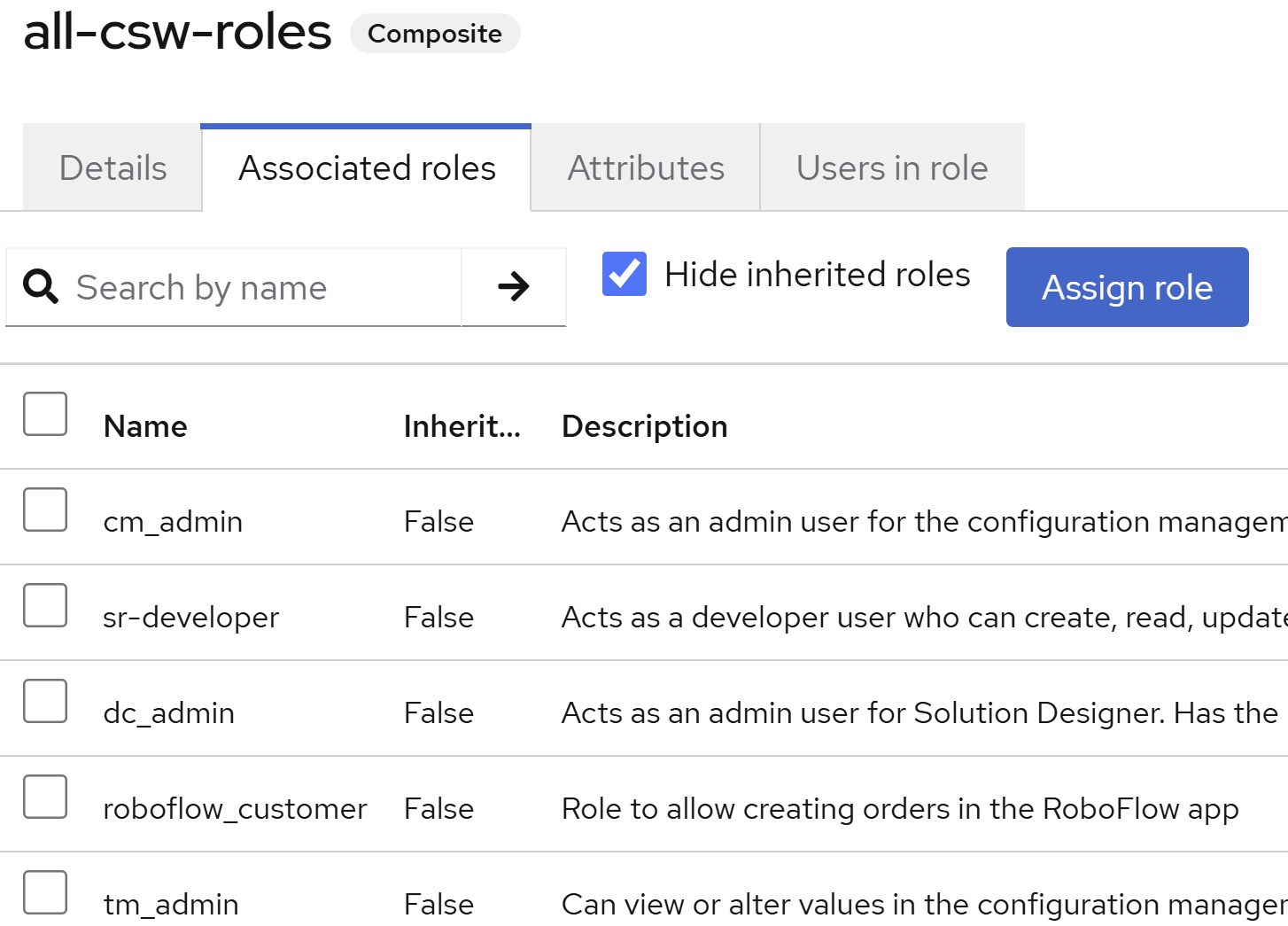
For the bearer tokens to have the necessary format, the specific role needs to be assigned to the Keycloak-user. This can be done via the Keycloak admin console.
As a conclusion, here is a graphical representation of the request flow within the pod for the described setup: