Consume Events from another Service
You want to consume an Event from a Service that has already been published so that you can implement logic that is executed when the Event is triggered.
Description
This How-To will show you how to discover an Event that has already been published in a Service and consume it using another Service. It will also show you how to develop and implement an agent for the consuming Service, as well as how to use this Service within an application.
Preconditions
- You have a Domain Service project in which an event shall be sent, e.g. within a Command or a Service.
- You modeled it in the Solution Designer, implemented it and pushed it successfully.
- The deploy pipeline for this Project was completed successfully.
- The service was deployed within an application.
Get an Overview of Scenario
In the example below, you can think of a Orders Service as a published Service that triggers an Event, and a Customer Notification Service as a consumer Service that consumes the Event and triggers an Agent, making it ready to use.
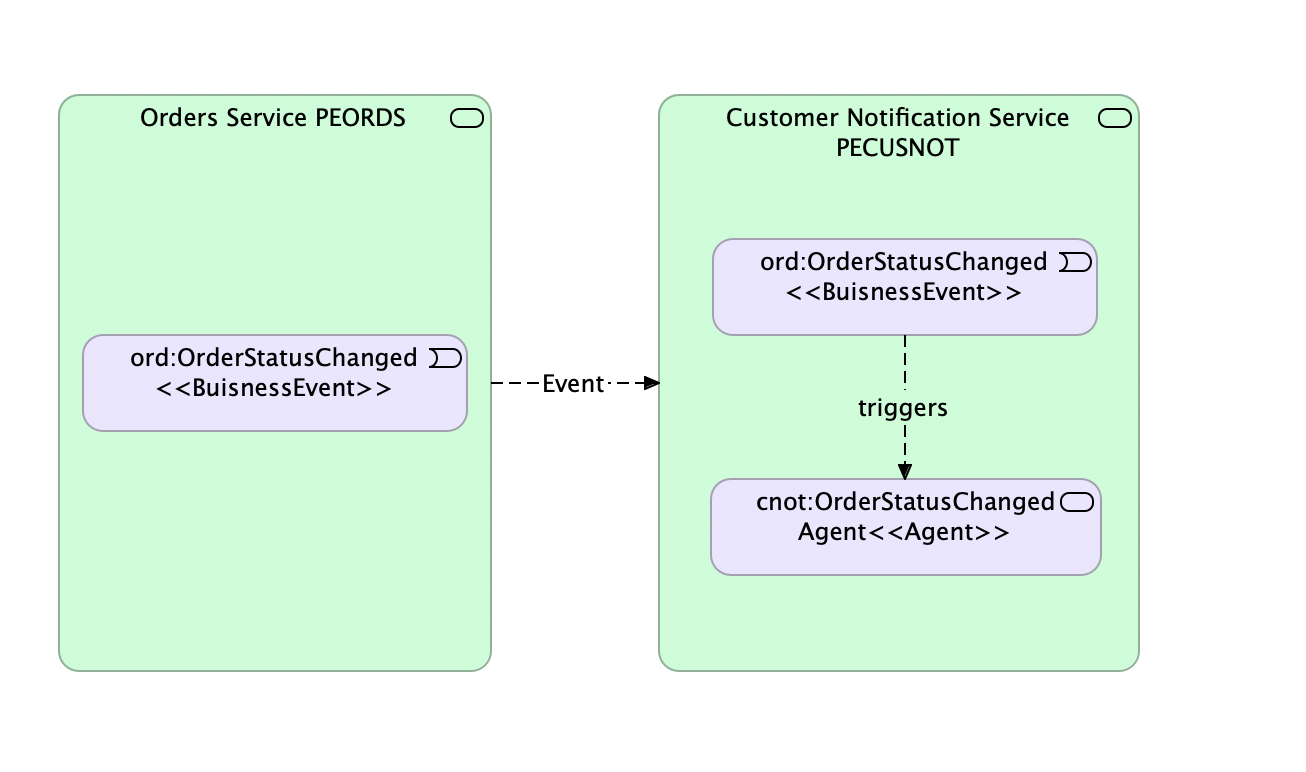
Discover an Event and its payload in the published Service
Please discover the Event and its modeled payload in the published Service in the Solution Designer.
Events need to be redesigned in the consuming service using the same namespace as in the publishing service and the schema should be used as the event payload. We recommend using the schema registry and Events 2.0. For more info, please visit our How-To: Use Events with Schema Registry
Steps
Re-model the Event and its payload in the consuming Service
For our scenario the Event is already prepared in the domain namespace as ord of the publishing Service. Now you need to re-model same into your consuming Service. To do this, please perform the following steps:
- Create your own Customer Notification Service Project.
- Create a same domain namespace ord in the consuming Service.
- Re-model the event and select the schema as the event payload from the schema registry.
- Commit and Push.
While creating an Event in the consuming service, it is important to use the same topic binding for both publishing and consuming Services. Also, it is important to use the schema as the event payload.
Create Agent in the consuming Service
For our use-case the event OrderStatusChanged is already prepared in the domain namespace ord of your published Service. To complete this you will have to create an Agent that uses the OrderStatusChanged event as trigger.
Now you will continue with creating the agent. To do this, please perform the following steps:
-
Navigate to the Agents tab in the namespace where you want to have your Agent located.
-
Create a new Agent OrderStatusChangedAgent, select OrderStatusChanged as trigger event and click on Create.
-
Commit and Push
Implement Agent in a Consuming Service
After designing the Agent, the logic needs to be implemented. This part is not done within the Solution Designer. Instead we will use the native development tooling on your local machine.
Please perform the following steps
-
Pull your changes via
k5 pull -
You can find the newly created Agent folder structure under
src-impl/domain/<your-namespace>/agents. It contains automatically generated stubs for your operations. -
Implement the Agent.
-
Run the following command
k5 push -m "Implementation Added"
- Either run a Deploy Pipeline or a Release Pipeline of your project in the Solution Designer if you want to use it in an Application.
Configure Topic Bindings in Application
To make the whole eventing scenario work within an Application you will have to configure the topic bindings properly.
-
Ensure that the latest version of your consuming service is added to your Application.
-
Open the topic bindings settings and discover the shown list.
There is at least one binding present for your consuming Service. If the publishing Service also has been added to the application, there will be another entry for this service as well.
-
To allow for proper communication between the services, event topic bindings need to be configured to use the same topic name.
Both Services are in the same Application:
- Open the Edit action for the topic binding of your publishing service.
- If there is no value set as topic name yet, please specify one and save.
- Copy topic name value from publishing Service.
- Edit consuming topic binding to have the same topic name.
Services are in different Applications:
- Open Application of publishing Service.
- Open topic bindings settings.
- Copy topic name from there.
- Switch back to Application of consuming Service.
- Edit consuming topic binding to have the same topic name.
-
Deploy your service by commiting the Application.
Congratulations! You have successfully consumed an Event from published Service. If the Event is published now, your Agent should be executed automatically.