Use Enterprise Events with Schema Registry
For your asychronous communications within and between services, you want to establish well defined "contracts" of the event payload data for everyone to use by means of using the new schema registry supported feature in IBM DevOps Solution Workbench.
Description
This How-To will cover how you can configure the schema registry that holds the definitions of the possible payload structures, use enterprise events in your service and migrate old events to the new events 2.0.
Please note that the links to the workbench tools in this tutorial only apply to the IBM Education Environment we provide. If you are using a different environment, e.g. your own installation, you will need to navigate directly to the required tools.
The Workbench uses Apicurio as a schema Registry. The schema is in format of JSON Schema 2019-09.
How to configure
In order to setup the Schema Registry integration, you will need to add the following secrets to the deployment target
k5-schema-registry-binding
- URL; Schema Registry URL.
- securityEnabled; Boolean indicating whether security is enabled for the Schema Registry. If yes, more data for authentication will have to be provided.
You will need the following secret only if k5-schema-registry-binding.securityEnabled is TRUE.
k5-schema-registry-oauth-secret
- baseurl; Base url of Schema Registry authentication server.
- realm; Schema Registry authentication realm.
- client.id; Schema Registry client id.
- client.secret; Schema Registry client secret.
How to migrate old events to events 2.0
If you have used events in your services, it is possible to migrate your existing events to the new events using schemas. To migrate events in your Domain Service projects to use schemas instead of entities, you need to follow some simple steps.
Java Pre-Migration steps
For Java language as implementation language, there are some preparatory steps that should be executed before migrating old events to events 2.0.
- Clone (k5 clone) or update (k5 pull) your Domain Service service project.
- Open your Domain Service service project.
- Navigate to pom.xml file.
- Search for the parent attribute and change it to match the new "cp-framework-sdk" version, see the following snippet example:
<parent>
    <groupId>de.knowis.cp.sdk</groupId>
    <artifactId>cp-framework-managed-sdk-parent</artifactId>
    <version>4.0.173</version> <!-- Update this to the new version -->
    <relativePath>
        ./framework/repo/de/knowis/cp/sdk/cp-framework-managed-sdk-parent/4.0.173/cp-framework-managed-sdk-parent
    </relativePath>
</parent>
- Push your adjustment and run pipeline to make sure projects deploy successfully.
Migration steps
Create New Schema
-
Open the Schema page in the Solution Designer.
-
Create a new schema containing all the properties needed for the event.
Adjust event in producing service
- Create a new event for the use case you want to migrate.
- Choose a new topic for it (one topic per event is suggested and recommended).
- Add your schema as payload of the event.
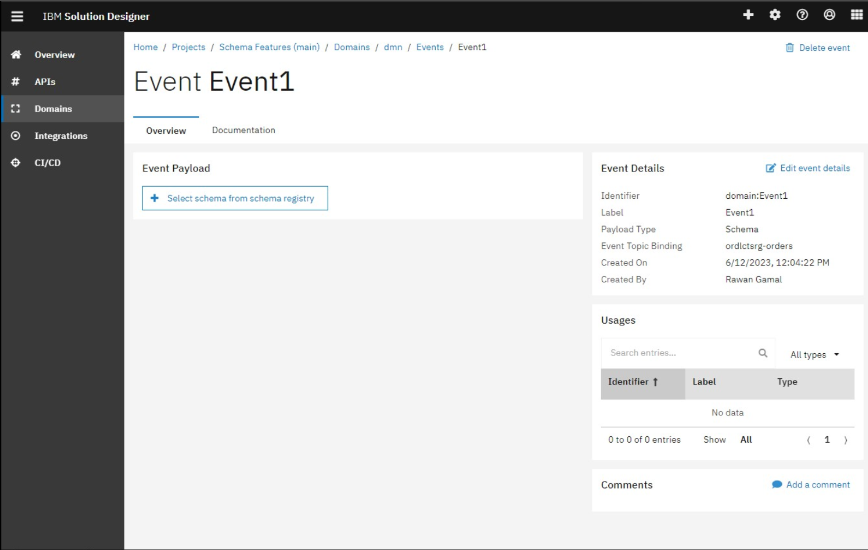
- Keep the old event to still support the old behavior.
- Commit and push changes in Solution Designer.
- Clone/Pull your project.
- Implement new publishing logic.
- Deploy/Release your service by triggering a pipeline. After these steps, your service will now publish the old and the new event.
Adjust agent in the consuming service
You can adjust your agent in two different ways, either adjusting an existing service or creating a new event.
The following steps will show you how to adjust the existing event
- Remove the entity payload from the event.
- Adjust topic binding of the event to use the same one as in the consuming service.
- Select the new schema as payload for the event.
- Commit and push changes in Solution Designer.
- Clone/Pull your project.
- Adjust agent implementation to deal with the new event payload.
- Deploy/Release your service by triggering a pipeline.
Alternatively, you can create a new event and replace the old one
- Create a new event using the same topic binding as in the consuming service.
- Select the new schema as payload for the event.
- Create a new agent using the event as trigger event.
- Delete old event and agent.
- Commit and push changes in Solution Designer.
- Clone/Pull your project.
- Implement agent implementation of the new agent.
- Cleanup agent implementation of the old agent.
- Deploy/Release your service by triggering a pipeline.
Either ways, following the previous steps, your service will now use the new event and no longer the old event.
After you ensured, that all consuming services use the new event, you can delete the old event and deploy your service again.
How to use events in your service
Define event payload
An event can carry a payload with it which can hold additional information around what happened, e. g. the orderId of the order that has been created or the new name of a customer after it changed.
To ensure governance when dealing with events, schemas from a shared schema registry are used to describe the payload of an event. They act as a reliable contract between event producers and consumers.
Within an event, you can define your schema via the Select schema from schema registry capability. IBM DevOps Solution Workbench will offer you all schemas from the connected schema registry. As a schema can evolve over time, multiple versions of the schema can exist. Therefore, the version has to be chosen in the second step. There, you also get an overview of all the properties that are defined for the schema.
When a schema has been used as event payload in the event producer, the same schema is expected to be chosen in the service that consumes the event.
Update schema version of event payload
As requirements change over time, new versions of schemas get created and usually the events want to use the new structure as well.
To update the event to use a new schema version, please use the Change schema version capability on the event page. Select your version of choice in the dropdown and save the changes for updating the event.
It is recommended to not update your event to a schema that has breaking changes to the current one. Otherwise event consumers will fail when they are processing the events. If you have major changes that you want to implement, it is recommended to create a new event publishing on a new topic. After all consumers are adjusted to use the new event, it is safe to delete the "old" one.
It is also possible that the producer service updates to a new version of the schema, while the consumer services still keeps the older version. The consuming of the event will keep working as long as no breaking change in the new schema version.
Now, you understand all about using events with Schema Registry.
Related Links
Please find more information about Schema Registry: