Unit 10: Set up Project for Implementation
In this course you will learn how to set up your domain service project for the implementation on your local machine using the Solution CLI. You will also learn how to provide additional code manually to make it usable across the implementation stubs.
Outline
Now that the design of the domain service is done, the next phase in service development is the implementation.
Since this phase is performed on your local machine instead of the Solution Designer, it is required that the Solution CLI is installed and the files of the domain service project exist on your local machine.
Then the IBM DevOps Solution Workbench is able to generate the boilerplate code and implementation stubs for your commands, services, operations etc. based on the design you have created in the Solution Designer.
With this, you as a developer only have to focus on implementing the actual logic of your functions and classes inside the domain service project.
You can do the implementation with an IDE of your choice just like you would do it in any other software project, but the speed of the development process increases significantly because of the capabilities of the IBM DevOps Solution Workbench.
Furthermore, the IBM DevOps Solution Workbench does not restrict you to only rely on the generated files, you are able to add your own classes alongside the implementation stubs. The most common use cases to do so are the following:
- Grouping code into one function that is used often and in different files (e.g. mapping entities to API schemas and vice versa)
- Extending existing capabilities of the IBM DevOps Solution Workbench (e.g. searching instances in the database via filters)
Exercise
Estimated time: 15 minutes
Exercise goal: After completing this course you will be able to clone your projects to your local machine, provide additional stubs manually and be ready to implement your business logic.
Supported languages: TypeScript and Java
In this exercise, we will do all necessary steps to set up your Orders project so that we are ready to implement the actual logic of its commands, services, operations etc.
- Therefore, we will install the Solution CLI to enable the code generation capabilities of the IBM DevOps Solution Workbench on your local machine.
- Then we will clone the Orders project to enable editing it on your local machine.
- As a last step, we will manually add code for the mapping between the orders' entities and API schemas and for filtering the order instances in the database (the latter only for Java).
Step 1: Install the Solution CLI
If you have not already done this step, please follow the instructions of course set up your local development environment. After successfully installing the Solution CLI, return to this course.
Step 2: Clone the Orders project
Now that you have installed the Solution CLI, you can use it to clone the project to your local machine.
If you rather want to start with implementing the actual logic of the Orders service right away than performing the preparation steps by yourself, you can use an already prepared asset to continue the following courses.
In this case - depending on the chosen implementation language - use either asset "Order_Java_Code_0.1" or "Order_TypeScript_Code_0.1" to create a new project and clone it to your local machine.
You can look up how to create a new project from the Order assets in the Preparation section in the Course Introduction.
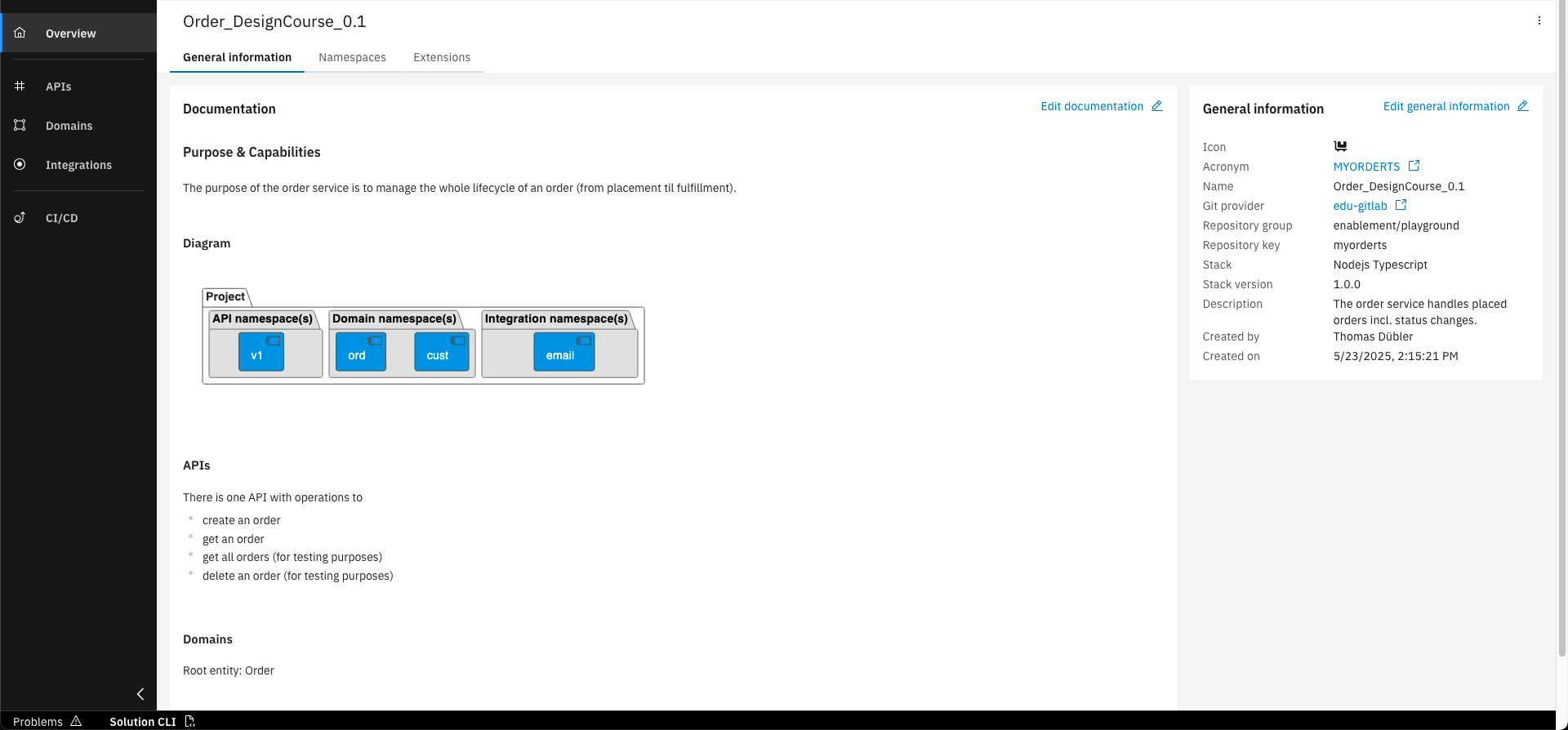
Open your project and click on the "Solution CLI" button on the bottom
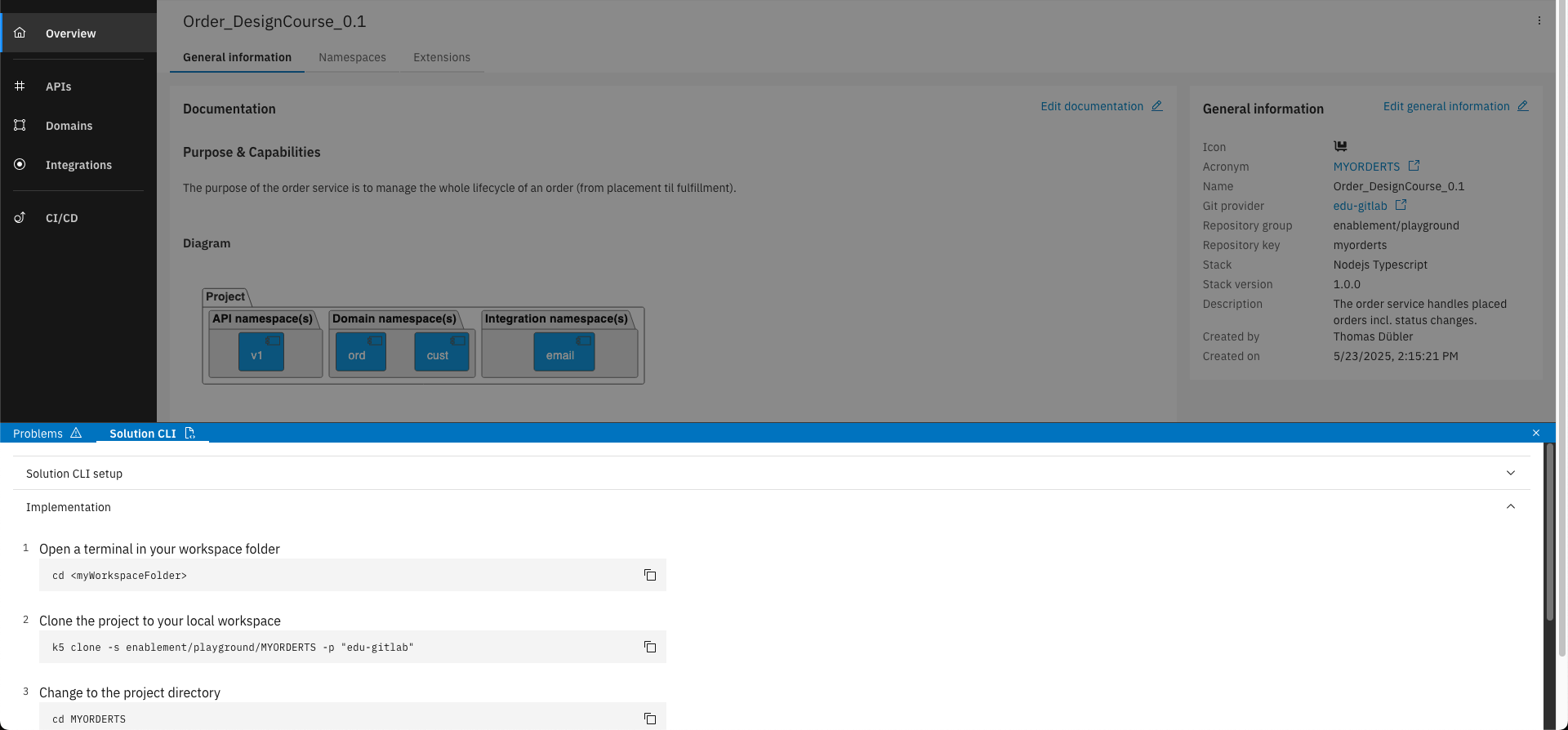
Follow the instructions in the section "Implementation". When cloning with the Solution CLI the code generation starts automatically.
Step 3: Add additional classes manually alongside implementation stubs
After cloning your Orders project with the help of the Solution CLI, the implementation stubs are now available on your local machine.
Before implementing the business logic, we will provide additional files to our implementation with code that is not generated, but used later in several classes.
For both Java and TypeScript, we will use one file to bundle all mappings from entities to schemas and vice versa.
Additionally for Java, we will use another file to extend the filter capabilities when searching for instances in the database.
In TypeScript the latter is not necessary because we get along with the built-in filter capabilities of the IBM DevOps Solution Workbench.
You will get more impressions there in the following courses.
Add code for mapping between entities and API schemas
- Java
- TypeScript
-
Open folder
/src/main/java/<package-name>/api/v1and create a new folderutils.<package-name>: The package name of the Java project (e.g.com.knowis.orderjfinal) -
In the new folder, create a new file
MappingUtils.java. -
Add the following code to the new file:
ℹ️noteWhen you create a Java class in some IDEs like IntelliJ, the corresponding file already contains the class definition on creation. In that case, remove the pre-generated content before you add the code below.
package com.knowis.orderjfinal.api.v1.utils;

import com.knowis.orderjfinal.sdk.api.v1.model.Currency;
import com.knowis.orderjfinal.sdk.api.v1.model.Order;
import com.knowis.orderjfinal.sdk.api.v1.model.OrderItem;
import com.knowis.orderjfinal.sdk.domain.ord.entity.CustomerOrder;
import com.knowis.orderjfinal.sdk.domain.ord.entity.InternalOrder;
import com.knowis.orderjfinal.sdk.domain.ord.entity.OrderItemEntity;
import k5.sdk.springboot.domain.type.Money;

public class MappingUtils {

  /**
  * Maps a {@link Money} entity to a {@link Currency} schema.
  *
  * @param currencyEntity
  *          the entity to map
  * @return the mapped schema
  */
  public static Currency mapCurrencyEntityToSchema(Money currencyEntity) {
    Currency currencySchema = new Currency();
    currencySchema.setCurrencyCode(currencyEntity.getCurrency().getCurrencyCode());
    currencySchema.setValue(currencyEntity.getAmount());

    return currencySchema;
  }

  /**
  * Maps a {@link Currency} schema to a {@link Money} entity.
  *
  * @param currencySchema
  *          the schema to map
  * @return the mapped entity
  */
  public static Money mapCurrencySchemaToEntity(Currency currencySchema) {
    Money currencyEntity = new Money();
    currencyEntity.setCurrency(java.util.Currency.getInstance(currencySchema.getCurrencyCode()));
    currencyEntity.setAmount(currencySchema.getValue());

    return currencyEntity;
  }

  /**
  * Maps an {@link com.knowis.orderjfinal.sdk.domain.ord.entity.OrderItem} entity
  * to an {@link OrderItem} schema.
  *
  * @param orderItemEntity
  *          the entity to map
  * @return the mapped schema
  */
  public static OrderItem mapOrderItemEntityToSchema(
          com.knowis.orderjfinal.sdk.domain.ord.entity.OrderItem orderItemEntity
  ) {
    OrderItem orderItemSchema = new OrderItem();
    orderItemSchema.setDescription(orderItemEntity.getDescription());
    orderItemSchema.setName(orderItemEntity.getName());
    orderItemSchema.setPrice(mapCurrencyEntityToSchema(orderItemEntity.getPrice()));
    orderItemSchema.setQuantity(orderItemEntity.getQuantity());
    orderItemSchema.setProductId(orderItemEntity.getProductId());
    orderItemSchema.setProductCategory(orderItemEntity.getProductCategory());

    return orderItemSchema;
  }

  /**
  * Maps an {@link OrderItem} schema to an
  * {@link com.knowis.orderjfinal.sdk.domain.ord.entity.OrderItem} entity.
  *
  * @param orderItemSchema
  *          the schema to map
  * @return the mapped entity
  */
  public static com.knowis.orderjfinal.sdk.domain.ord.entity.OrderItem mapOrderItemSchemaToEntity(
          OrderItem orderItemSchema
  ) {
    com.knowis.orderjfinal.sdk.domain.ord.entity.OrderItem orderItemEntity = new OrderItemEntity();
    orderItemEntity.setDescription(orderItemSchema.getDescription());
    orderItemEntity.setName(orderItemSchema.getName());
    orderItemEntity.setPrice(mapCurrencySchemaToEntity(orderItemSchema.getPrice()));
    orderItemEntity.setQuantity(orderItemSchema.getQuantity());
    orderItemEntity.setProductId(orderItemSchema.getProductId());
    orderItemEntity.setProductCategory(orderItemSchema.getProductCategory());

    return orderItemEntity;
  }

  public static Order mapOrderEntityToSchema(com.knowis.orderjfinal.sdk.domain.ord.entity.Order orderEntity) {
    String referenceId = (orderEntity instanceof CustomerOrder)
            ? ((CustomerOrder) orderEntity).getCustomerReferenceId()
            : ((InternalOrder) orderEntity).getInternalReferenceId();

    Order orderSchema = new Order();
    orderSchema.setId(orderEntity.getId());
    orderSchema.setStatus(Order.StatusEnum.valueOf(orderEntity.getStatus().name()));
    orderSchema.setReferenceId(referenceId);
    orderSchema.setCreatedOn(orderEntity.getCreatedOn());
    orderSchema.setTotalPrice(mapCurrencyEntityToSchema(orderEntity.getTotalPrice()));
    orderSchema.setOrderItems(orderEntity.getOrderItems().stream().map(MappingUtils::mapOrderItemEntityToSchema).toList());

    return orderSchema;
  }
} -
The package name of the provided code is
com.knowis.orderjfinal. Replace all occurrences of this phrase in the file, if the package name of your project is different.
-
Open file
/src-impl/util/Mapper.ts. -
Replace the entire content of the file with the following code:
import BigNumber from 'bignumber.js';
import { mappers, Context, ObjectSchemaObject, Entity } from 'solution-framework';
import { Order } from 'solution-framework/dist/sdk/v1/namespace/apis/v1/model/order';
import { OrderCreateInput } from 'solution-framework/dist/sdk/v1/namespace/apis/v1/model/order-create-input';
import { OrderItem } from 'solution-framework/dist/sdk/v1/namespace/apis/v1/model/order-item';
import { ord_CreateOrder_Input } from 'solution-framework/dist/sdk/v1/namespace/entity/ord_CreateOrder_Input';
import { ord_CustomerOrder } from 'solution-framework/dist/sdk/v1/namespace/entity/ord_CustomerOrder';
import { ord_Order } from 'solution-framework/dist/sdk/v1/namespace/entity/ord_Order';
import { ord_OrderItem } from 'solution-framework/dist/sdk/v1/namespace/entity/ord_OrderItem';

/**
* This class can be used to implement mapping logic between schemas and entities,
* It has access to instanceOf operator, factory and logger.
*/
export class Mapper extends mappers.BaseMapper {
  constructor(context: Context) {
    super(context);
  }

  public mapRequestInputToCreateOrderInput(requestInput: OrderCreateInput): ord_CreateOrder_Input {
    const log = this.log;
    log.debug('mapRequestInputToCreateOrderInput()');

    const createOrderInputEntity = this.factory.entity.ord.CreateOrder_Input();
    createOrderInputEntity.orderItems = requestInput.orderItems.map(inputItem => this.mapOrderItemSchemaToEntity(inputItem));
    createOrderInputEntity.orderType = requestInput.orderType;
    createOrderInputEntity.referenceId = requestInput.referenceId;

    return createOrderInputEntity;
  }

  public mapOrderItemSchemaToEntity(orderItemSchema: OrderItem): ord_OrderItem {
    const log = this.log;
    log.debug('mapOrderItemSchemaToEntity()');

    const orderItem = this.factory.entity.ord.OrderItem();
    orderItem.description = orderItemSchema.description;
    orderItem.name = orderItemSchema.name;
    orderItem.productCategory = orderItemSchema.productCategory;
    orderItem.productId = orderItemSchema.productId;
    orderItem.quantity = BigInt(orderItemSchema.quantity);
    orderItem.price = {
      amount: new BigNumber(orderItemSchema.price.value),
      currency: orderItemSchema.price.currency_code
    }

    return orderItem;
  }

  public mapOrderEntityToSchema(orderEntity: ord_Order): Order {
    const log = this.log;
    log.debug('mapOrderEntityToSchema()');

    const mappedOrderItems: OrderItem[] = orderEntity.orderItems.map(item => this.mapOrderItemEntityToSchema(item));
    const referenceId = orderEntity instanceof ord_CustomerOrder ? orderEntity.customerReferenceId : orderEntity.internalReferenceId;

    return {
      id: orderEntity._id,
      createdOn: orderEntity.createdOn.toISOString(),
      orderItems: mappedOrderItems,
      referenceId: referenceId,
      status: orderEntity.status,
      totalPrice: {
        value: orderEntity.totalPrice.amount.toNumber(),
        currency_code: orderEntity.totalPrice.currency
      }
    }
  }

  public mapOrderItemEntityToSchema(orderItemEntity: ord_OrderItem): OrderItem {
    const log = this.log;
    log.debug('mapOrderItemEntityToSchema()');

    return {
      productId: orderItemEntity.productId,
      quantity: Number(orderItemEntity.quantity),
      productCategory: orderItemEntity.productCategory,
      price: {
        value: orderItemEntity.price.amount.toNumber(),
        currency_code: orderItemEntity.price.currency
      },
      name: orderItemEntity.name,
      description: orderItemEntity.description
    };
  }

  // Add any other specific mapping methods

  /**
  * This method is needed for logging purposes to provide file path to log statements.
  */
  protected getSrcImplPath(): string {
    return 'src-impl/util/mapper';
  }
}
As you can see, the mapper class contains different methods which map entities to schemas and vice versa. Now they can be used in all other implementation classes, which will be shown in the following courses.
If you want a detailed description on how to define mappings on your own, please have a look at the following two links:
Java offers built-in capabilities for mapping between classes via a ModelMapper class.
The Java version of the How-To covers this kind of mapping. When configured properly, properties of similar classes can be mapped automatically, which may ease the implementation.
For the implementation phase of your training we provide code that maps the properties of the corresponding classes in a manual way one by one.
Extend filter capabilities in searching for database instances (only Java)
- Java
-
Open folder
/src/main/java/<package-name>/domain/ordand create a new folderrepository.<package-name>: The package name of the Java project (e.g.com.knowis.orderjfinal) -
In the new folder, create a new file
CustomOrderRepository.java. -
Add the following code to the new file:
ℹ️noteWhen you create a Java class in some IDEs like IntelliJ, the corresponding file already contains the class definition on creation. In that case, remove the pre-generated content before you add the code below.
package com.knowis.orderjfinal.domain.ord.repository;

import com.knowis.orderjfinal.sdk.domain.ord.entity.CustomerOrder;
import com.knowis.orderjfinal.sdk.domain.ord.entity.Order;
import com.knowis.orderjfinal.sdk.domain.ord.repository.OrderRepository;
import com.knowis.orderjfinal.sdk.domain.ord.type.Status;
import org.slf4j.Logger;
import org.slf4j.LoggerFactory;
import org.springframework.context.annotation.Primary;
import org.springframework.data.mongodb.core.MongoOperations;
import org.springframework.data.mongodb.core.query.Criteria;
import org.springframework.data.mongodb.core.query.Query;
import org.springframework.data.mongodb.repository.query.MongoEntityInformation;
import org.springframework.stereotype.Service;

import java.util.List;

@Service
@Primary
public class CustomOrderRepository extends OrderRepository {
  private static final Logger log = LoggerFactory.getLogger(CustomOrderRepository.class);

  public CustomOrderRepository(MongoEntityInformation<Order, String> metadata, MongoOperations mongoOperations) {
    super(metadata, mongoOperations);
  }

  /**
  * This method finds all CustomerOrders which match the given customerReferenceId and status.
  * The status is allowed to be one of the given allowedStatusList. If null or empty, all status values are allowed.
  *
  * @param customerReferenceId The customerReferenceId to search for.
  * @param allowedStatusList   The list of allowed status values.
  * @return A list of CustomerOrders which match the given criteria.
  */
  public List<CustomerOrder> findCustomerOrdersByStatus(String customerReferenceId, List<Status> allowedStatusList) {
    Query query = new Query();
    Criteria finalCriteria;

    // Create the criteria for only searching customer orders
    Criteria customerOrderCriteria = Criteria.where("_class").is("ord:CustomerOrder");

    // Create the criteria for the customerReferenceId
    Criteria customerReferenceCriteria = Criteria.where("customerReferenceId").is(customerReferenceId);

    // Create the final criteria
    if (allowedStatusList == null || allowedStatusList.isEmpty()) {
      finalCriteria = new Criteria().andOperator(List.of(customerOrderCriteria, customerReferenceCriteria));
    }
    else {
      // Create the criteria for the status
      Criteria statusCriteria = Criteria.where("status").in(allowedStatusList);

      finalCriteria = new Criteria().andOperator(
              List.of(customerOrderCriteria, customerReferenceCriteria, statusCriteria)
      );
    }

    // Log the final criteria object
    String jsonCriteriaObject = finalCriteria.getCriteriaObject().toJson();
    log.debug("Criteria-Object: {}", jsonCriteriaObject);

    // Cast the matching elements from type Order to CustomerOrder and return the list
    return this.mongoOperations.find(
            query.addCriteria(finalCriteria),
            this.entityInformation.getJavaType(),
            this.entityInformation.getCollectionName()
    )
            .stream()
            .map(order -> (CustomerOrder) order)
            .toList();
  }
} -
The package name of the provided code is
com.knowis.orderjfinal. Replace all occurrences of this phrase in the file, if the package name of your project is different.
As you can see, the custom repository class extends generated repository class. With this, you are able to use database operations provided by both Java Spring Boot and the IBM DevOps Solution Workbench simultaneously in order to extend the filter capabilities of the Workbench regarding searching for database instances.
If you want a detailed description on how to extend repository classes for advanced filtering on your own, check out How-To: Extend MongoDB Repositories for advanced filtering.
You have successfully cloned your project and have prepared for the implementation with additional classes! Now you are able to transfer projects from the Solution Designer to your local machine and to discover the generated boilerplate code and implementation stubs. You can now start coding with your preferred IDE!
What's next?
In the courses for designing a domain service project, we have already adjusted the Orders service based on the new business requirements. For all of these changes you will learn how to implement the code in the following courses.
Related Links
Please find more information about the Solution CLI in the following links: