Create custom Pipelines to deploy to a remote Cluster
You want to deploy a solution you built with IBM DevOps Solution Workbench to an OpenShift© cluster different from the one IBM DevOps Solution Workbench is installed on.
Description
This How-To will guide you through the process of creating a custom pipeline for your project that will build your solution and then deployed to a remote cluster.
Pre-Requisites
- Access to another OpenShift cluster.
- A namespace on that cluster your solution can be deployed to.
- Working network connectivity between the cluster IBM DevOps Solution Workbench is installed on and the cluster you want to deploy to.
Steps
- Identify namespace on remote cluster - we will call that target namespace from now on.
- Make sure that namespace is setup according to Creating new deployment targets manually. This will ensure that the solution that you are deploying is able to find required runtime configuration concerning authentication , data persistence etc.
- Create a new Pipeline resource as described in Create own Pipeline type (template) and add the Workbench provided Task
k5-deploy-remoteas one of the tasks of that new pipeline.
apiVersion: tekton.dev/v1beta1
kind: Pipeline
metadata:
  annotations:
    k5-display-name: Custom Remote Deploy pipeline
    k5-supported-stacks: java
  namespace: education
  name: k5-template-java-remote-deploy
  labels:
    k5-pipeline-type: custom
    k5-pipeline-template: 'true'
spec:
  params:
    - description: Defines the repository url
      name: repo-url
      type: string
    - description: Defines the revision of the git repository
      name: revision
      type: string
    - description: Defines the stack
      default: JAVA
      name: stack
      type: string
    - description: Defines if unit tests should be executed
      default: 'false'
      name: unittestfeature
      type: string
    - description: Defines whether it needs to be a unique pre-release
      default: 'false'
      name: prereleaseuniqueness
      type: string
    - description: Defines where uniqueness needs to be enforced
      default: 'false'
      name: enforceuniqueness
      type: string
    - description: Defines if the artifacts should be published
      default: 'false'
      name: publish
      type: string
    - description: Defines the solution acronym
      name: solutionacronym
      type: string
    - description: Defines whether a unique semVer check is executed
      name: uniquesemvercheck
      type: string
    - description: Defines the secret name used for the oc login to a remote cluster
      default: k5project-remote-login-secret
      name: oc-remote-login-secret
      type: string
    - description: Defines the values.yaml that is used for the helm deployment
      default: |
        environment:
          host: <HOSTNAME OF REMOTE CLUSTER>
      name: deployment-values-yaml
      type: string
    - description: Defines in which deployment target (k5project) the service should be deployed in your remote cluster
      default: <YOUR TARGET NAMESPACE>
      name: remote-k5project
      type: string
  tasks:
    - name: k5-git-clone
      params:
        - name: repo-url
          value: $(params.repo-url)
        - name: revision
          value: $(params.revision)
      taskRef:
        kind: Task
        name: k5-git-clone
      workspaces:
        - name: output
          workspace: source
        - name: basic-auth
          workspace: basic-auth
    - name: k5-validate
      params:
        - name: solutionacronym
          value: $(params.solutionacronym)
        - name: stack
          value: $(params.stack)
        - name: prereleaseuniqueness
          value: $(params.prereleaseuniqueness)
        - name: uniquesemvercheck
          value: $(params.uniquesemvercheck)
        - name: enforceuniqueness
          value: $(params.enforceuniqueness)
      runAfter:
        - k5-git-clone
      taskRef:
        kind: Task
        name: k5-validate
      workspaces:
        - name: source
          workspace: source
    - name: k5-generate-code-java
      params:
        - name: solutionacronym
          value: $(params.solutionacronym)
        - name: stack
          value: $(params.stack)
      runAfter:
        - k5-validate
      taskRef:
        kind: Task
        name: k5-generate-code-java
      workspaces:
        - name: source
          workspace: source
    - name: k5-build-application-java
      params:
        - name: solutionacronym
          value: $(params.solutionacronym)
        - name: stack
          value: $(params.stack)
        - name: unittestfeature
          value: $(params.unittestfeature)
      runAfter:
        - k5-generate-code-java
      taskRef:
        kind: Task
        name: k5-build-application-java
      workspaces:
        - name: source
          workspace: source
    - name: k5-build-publish-image-java
      params:
        - name: solutionacronym
          value: $(params.solutionacronym)
        - name: stack
          value: $(params.stack)
      runAfter:
        - k5-build-application-java
      taskRef:
        kind: Task
        name: k5-build-publish-image-java
      workspaces:
        - name: source
          workspace: source
    - name: k5-build-publish-chart-java
      params:
        - name: solutionacronym
          value: $(params.solutionacronym)
        - name: publish
          value: $(params.publish)
        - name: stack
          value: $(params.stack)
      runAfter:
        - k5-build-publish-image-java
      taskRef:
        kind: Task
        name: k5-build-publish-chart-java
      workspaces:
        - name: source
          workspace: source
    - name: k5-deploy-remote
      params:
        - name: solutionacronym
          value: $(params.solutionacronym)
        - name: remote-k5project
          value: $(params.remote-k5project)
        - name: deployment-values-yaml
          value: $(params.deployment-values-yaml)
        - name: oc-remote-login-secret
          value: $(params.oc-remote-login-secret)
      runAfter:
        - k5-build-publish-chart-java
      taskRef:
        kind: Task
        name: k5-deploy-remote
      workspaces:
        - name: source
          workspace: source
  workspaces:
    - name: source
    - name: basic-auth
You can introduce any parameters in pipeline resources. To set their values use the default field as the CI/CD Ui in Solution Designer can not know the parameters you will create and therefor won't let you fill these parameters from the UI.
- Create the secret containing the credentials to connect to the remote cluster. To obtain those credentials look for a user with admin rights in the target namespace, then look for a secret of type 'kubernetes.io/service-account-token':
oc get secret --field-selector type=kubernetes.io/service-account-token
whose name starts with the name of the user or serviceaccount. Copy the value of the token field and use that in the secret you create. Also obtain the kube API url by running
oc cluster-info
Secret resource as referenced from pipeline resource (to be created on cluster where the pipeline runs):
kind: Secret
apiVersion: v1
metadata:
  name: k5project-remote-login-secret
  namespace: isw-namespace
data:
  token: <TOKEN YOU COPIED FROM ABOVE STEP>
  url: <KUBE API URL OF REMOTE CLUSTER>
type: Opaque
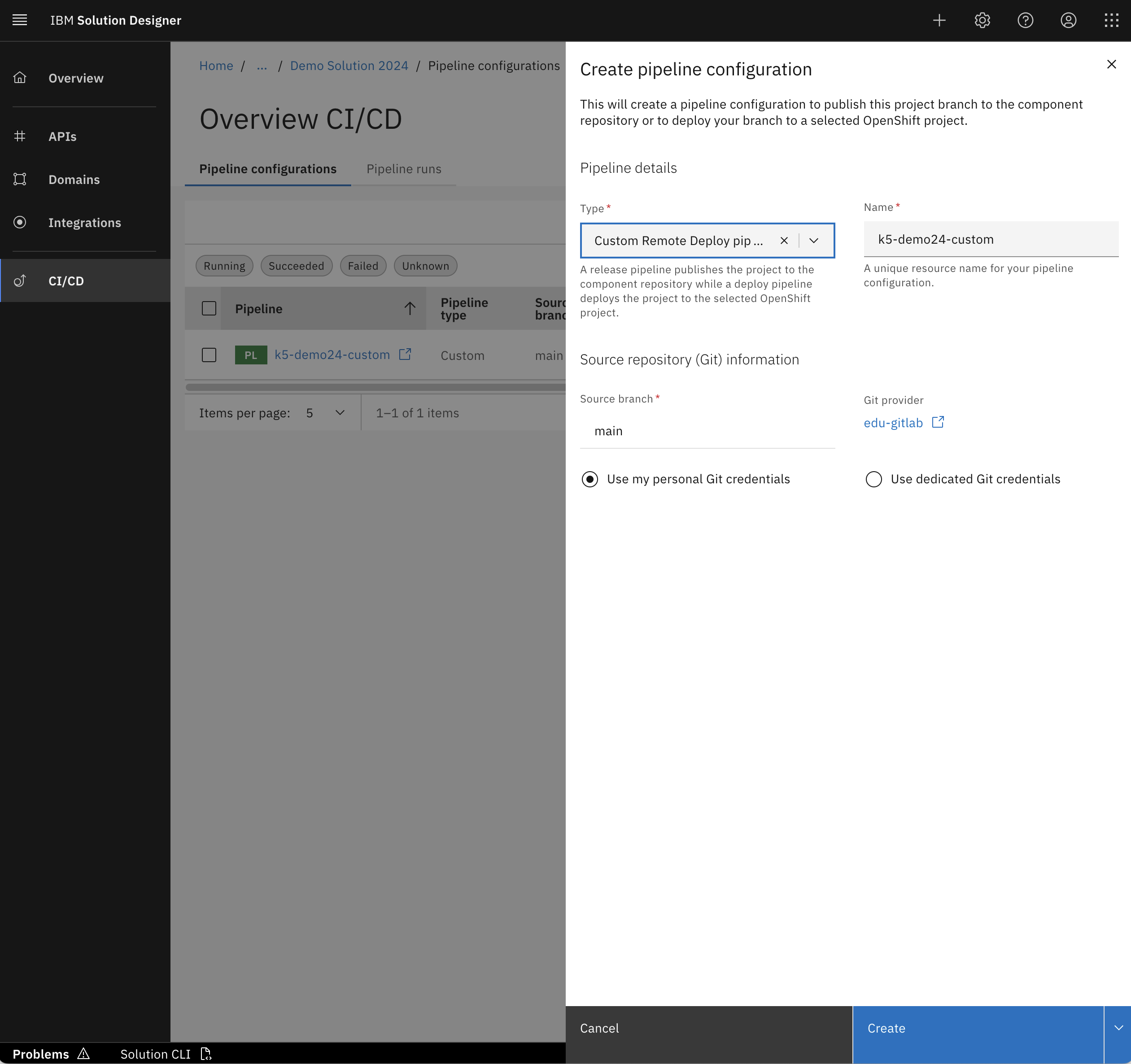
Once this setup is done, you can now open your solution in Solution Designer and create a new pipeline by choosing "Create pipeline configuration" from within the "CI/CD" menu. Choose the type "Custom Remote Deploy pipeline" (or whatever you chose as the value for the metadata.annotations.k5-display-name field in the Pipeline resource you created in step 3 above). You should now see the pipeline deploying your solution and the deployment appearing on your remote cluster.
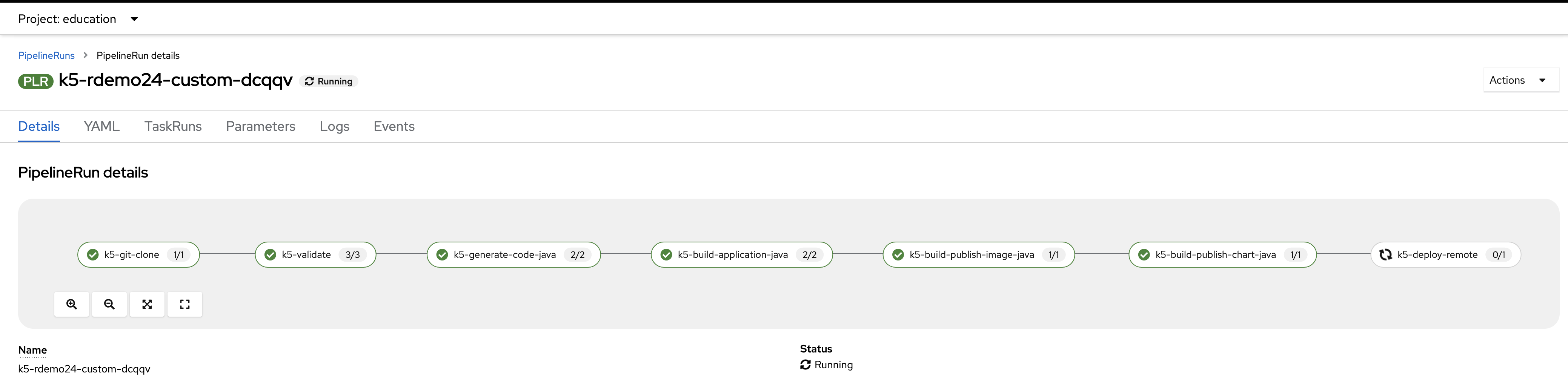
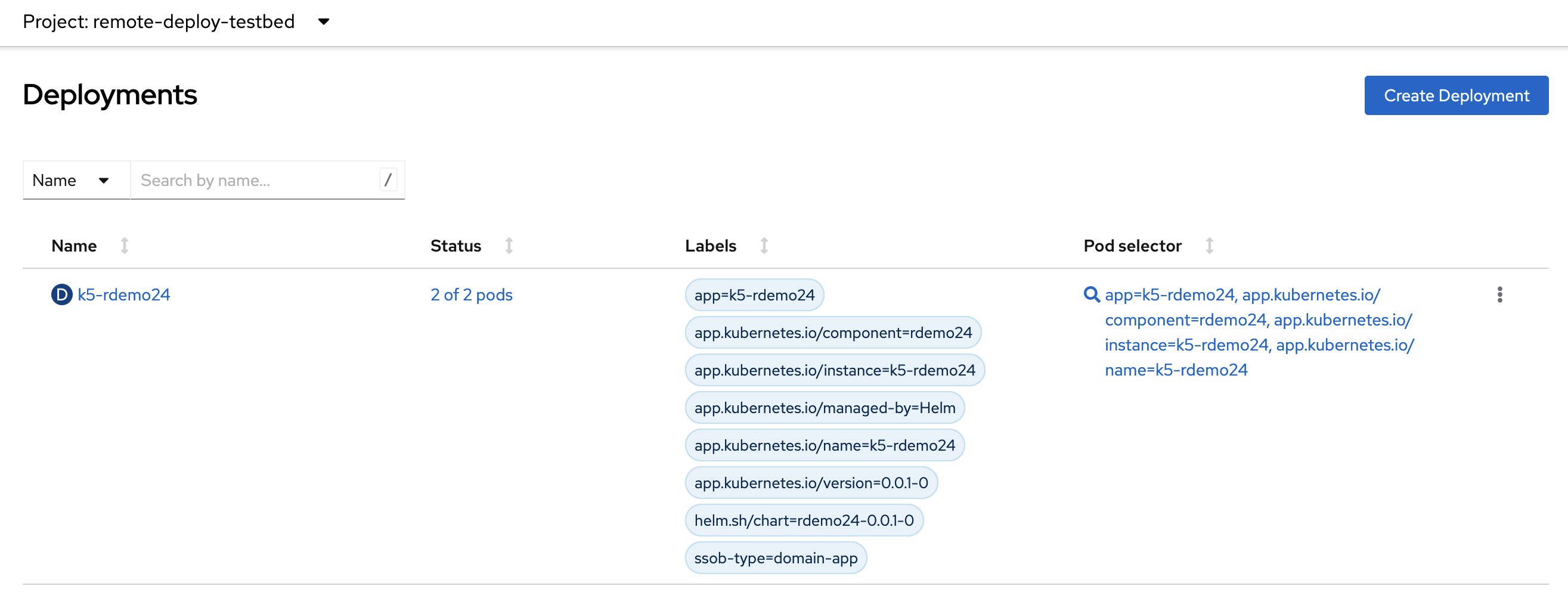
Congratulations! You can now deploy your solutions to remote clusters.